Tag Archives: Technology

4OD review

For all that video is the future of the web, few UK private sector companies seem to be managing it as well as the BBC. That’s certainly the case with 4OD, which, despite an early start, is noticeably less robust than iPlayer.

Now, as it happens, the E4/C4 programmes we watch are generally DVR-ed, so we have had little need to lean on it to date. However, until Damian told me about it, we entirely missed the newest retelling of the Arthurian legend, Camelot, currently airing on Channel 4. So we had to catch up on the first few episodes.

Generally speaking, the overall experience is significantly less slick than iPlayer for a number of reasons.

  1. On the same Internet connection (which is admittedly mediocre), caching takes place with intermittent irregularity. By which I mean, for no apparent reason, at random intervals, the video will stop whilst (presumably) the player catches up with content from the server. This very rarely happens with iPlayer for us, unless we’re watching something in high-definition.
  2. The picture quality is visibly crappier than iPlayer. Pixellation and artefacts are noticeable and distracting.
  3. No HD. Which is rubbish, really, given that the Beeb has it for all its tier 1 programming.
  4. It has an extremely shaky ad-insertion platform. First of all, 4OD has about three advertisers (Lynx, BT Vision and… 4OD during Camelot). Adverts for Camelot, available on 4OD (which is what we were watching), two versions of a BT Vision advert (sponsors of drama on C4) and an increasingly aggravating ‘premature perspiration’ advert from Lynx dry must have played a dozen times. Secondly, the ads force-play if you try to ‘resume play’ on a programme, which is just irritating (especially as you’ll have just seen them as they pre-roll before the show starts). Third, when watching episode two of Camelot, it skipped 20 minutes of vital exposition, having had someone presumably mistag what should happen after the second ad break.

On point 4) the mediocrity of the platform will likely keep sensible advertisers away. After all, if you know that your ad is going to end up annoying people through the frequency of play, why would you want that? Admittedly it does help with unprompted ad recall, but my affection for those brands is significantly diminished….

So, this is yet another reason I’m grateful for the BBC…

The cracks in the cloud

crack in the cloudsOn a recent enterprise software concern:

Me: "What browsers does your app support?"
Them: "IE7, IE8 and Firefox 3.6."
Me: "So, no current browser?"
Them: "No. But we’ve no reported issues in Chrome!"
Me: "But you don’t officially support Chrome?"
Them: "No, but we’ve never had an issue with it?"
Me: "Is that a question? What would you recommend?"
Them: "We support IE7, IE8 and Firefox 3.6."
Me: "But Microsoft and Mozilla are both forcing updates to IE9 and FF5 respectively?"
Them:"We support IE7, IE8 and Firefox 3.6. Oh, and we have an iPhone app."

Me: <sigh>.

This post was inspired by this Macworld article and real life experiences.

@Flipboard – a @gilesfraser recommendation

 flipboard

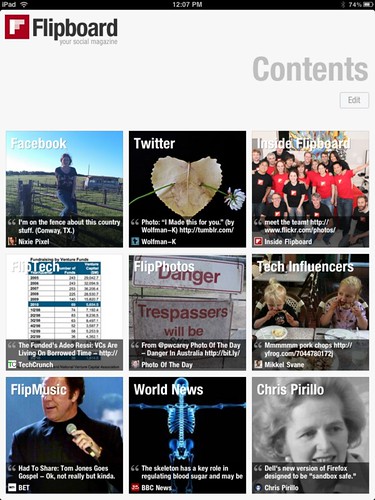
My boss is always pleased to educate me – a self-professed, archetypal earlius adopterus – with his technical insight and technology trendsetting. He didn’t quite beat me to Spotify (although he was very early to that service), but he has stolen the march by introducing me to Flipboard, a ‘social magazine.’ I’d read about it but a combination of iPad apathy and happiness with my methods of absorbing media meant I didn’t investigate further.

Having now tried it, I can tell you that it is an awesome app that is making me fall in love with the iPad again. Essentially, it draws on any feeds you put into it – including a number of useful preset social accounts, such as Facebook, Twitter and Google Reader – and delivers them to you in a magazine style format. You flip through pages in which the content on links people have shared on Facebook and Twitter have been pre-fetched – and you can then tap through to the full article – or watch the video etc.

It’s a wonderful media engagement experience – you can download loads of stories over wifi and then mess around reading offline (for the most part, although the pre-fetch isn’t perfect), commenting on Facebook et al works when you’re online (would like a pre-caching service for when offline so you could maybe queue comments for publication when you came back into wifi range). You can also add any individual blog or feed you like as a separate magazine – all your subscriptions and services appear as a grid of tiles, Windows Phone 7 style.

Really beautifully executed and a very good use of the touch interface of the iPad. Recommended for all you iPad lovers out there – and division6.co.uk looks awesome on it!

My only issue is that I’m not sure it’s very good at ‘getting through’ a magazine or set of updates on Google Reader. Unlike the handy ‘unread post’ notifications you get with the web app, there’s a seemingly endless, jumbled set of updates displayed through the interface. My Google Reader subscriptions include about 40 feeds I read regularly – and about 200 I just dip into – so might well find it frustrating to deal with that much (less relevant) content. Whether I should just flip through it (it is effortless after all) or finally get around to dealing with my mess of subscriptions, who can say…?

Definitely a big thanks to Giles for the pointer!

Back to paperbacks

paperback writerThe last two books, and the next four, that I’m reading are honest-to-goodness, actual-dead-tree books. I would have preferred to Kindle them but the H2G2 book, the Ender Saga and the Mistborn trilogy aren’t available on Amazon’s service.

I’m neither loving nor loathing the experience (as far as turning actual pages is concerned). There’s a combination of the satisfaction of page turning and feeling your way through the bulk of a novel that’s satisfying, but there’s the fiddly inconvenience of not having it when you have a couple of minutes in a lift to read, or trying to read it at night in bed with an irritating, barely functional reading light, or trying to squeeze it into your work satchel between the car keys, Macbook and iPad…

Churchill on the Internet

Well, not really, obviously, but given my recent posts on various aspects of technology – in which Apple keeps rearing its beautiful, well-designed head – I thought it might be adapted.

Churchill reportedly said:

"Show me a young Conservative and I’ll show you someone with no heart. Show me an old Liberal and I’ll show you someone with no brains."

It strikes me that a similar analogue applies to openness on the Internet. At its core – openness is a good thing. It opens up consumer choice and lets those able to achieve ludicrous ends.

But in my old age (over 30 – therefore possibly not a digital native anymore!) – the practical realities of making everything work together in an open environment is just too much work. Hence the appeal of Evil Apple – with their closed, perfectly designed systems, you can’t do everything. But you don’t need a degree in software engineering to make it work.

I still believe that openness is a good and necessary thing. But I’m an increasingly practical, time-constrained man with too many hobbies for purely open technologies. So I’ll settle for a well-designed, well-executed closed system most times….

I’m still a liberal though. So in Churchill’s view, I’m either an idiot or… still young in some regards… or both.

The iCloud and the connected home?

iCloud I’ve been asked about the ‘Connected Home’ more often recently, by a number of different people. What options are there? Should I buy something?

My answer has been fairly consistent; we’re not there yet. Whatever you mean by ‘connected home’, it isn’t a mass market reality.

The disambiguation is necessary because people mean different things by it – either home automation or networked home entertainment systems – and in neither case are there simple, mass-market products or services for people to buy. By home automation, I mean the automation of household services and devices – for example, automatic, centrally controlled electrics and climate control, curtains that close when you clap, smart metering, Internet fridges and beyond. On the media/entertainment front – I mean streaming music and video to any screen or audio device, surround sound, etc.

On the home automation front, the reason things haven’t progressed is because it’s an expensive, niche market which hasn’t validated the investment to make popular. Everyone’s home is too different and too many mechanical bits and pieces would need to fit in place to make it useful. Standardisation – of things like low-power, short range wireless systems like Zigbee and beyond – has helped with automation of some household services (e.g. smart metering), but even those are a way away. And you’ll be hard pressed to standardise light switches, curtain rails, etc. – all the other bits and pieces which might want to be automated. It’s also largely unnecessary, lazy-making tech, IMHO, with the exception of things like smart electricity stuff which plays a broader role in managing energy usage and isn’t just a technology of convenience.

The reason in the home entertainment space is not dissimilar. There’s too much choice! People have hifis, TVs, iPod docks, PCs, PVRs and more; it’s a rare household that has them all from the same manufacturer and getting them to play nicely with each other – even in a uniform environment – can be an act of such astonishing Macgyvery that even those of us with the propensity and the skills prefer to opt for workarounds rather than actually blu-tak an integrated system together.

In addition, for media streaming to work within a home you need two things – fast, consistently reliable wifi (a dream for most people I know) AND a machine to act as a server – which you leave on all the time. Now, it’s well established that the majority of PCs sold are laptops. And it’s true (if less well established) that PCs left on all the time degrade faster (not to mention waste power the vast majority of the time). Wake-on-LAN – the technology by which these machines turn them selves on when triggered by network activity – has been available for some time, but is another configure-challenge. So I suspect – even in a world where you could buy a NAS or Windows Home Server to suit the purpose – that it will remain a distant dream.

Enter the iCloud. Apple’s world of slick hardware and software uniformity already makes its Airplay / iTunes media sharing features easier to configure than most ‘open’ systems. Not as easy as Spotify, sure, but complete with a massive user base, video as well as music, and a global audience. iCloud, putting all those shared music files into – what is to begin with a music locker but you can be sure in time will become a full-on-demand, real-time streaming cloud repository – paves the way for it to act as the cloud-based media server. So in the same was as AppleTV streams films for you, iPods, Macs and other iTunes enabled devices will be able to bring your media to any room at any time.

It’s frightening that Apple’s going to win here as well, but I don’t know if anyone else has the clout or vision to make this happen. Most people are too tied to commercial realities – that of a mixed market – but with Apple’s enormous margins, ridiculous profitability and ‘trojan horse’ appliances making their way into every room in the house, it seems an inevitability that they’ll win through in this market as it evolves. After all, an accidental connected home is still connected…

Windows 8 – designed to annoy CIOs?

OK, so the Windows 8 first look is out and – on the face of it – kind of cool. Finally, Microsoft has worked out what a touch screen interface should do differently! Although it does feel like a very early look – judging by the fact that when they showcase non-Windows 8 HTML5 apps – it looks exactly like Windows 7…

My comment about CIOs is not so much to do with the specifics of the platform – of which we’ve seen too little to say anything other than ‘oooh, shiny’ – but the speed of the refresh cycle. Thanks to the mediocrity of Windows Vista, most enterprises that run Windows (even smaller ones like the one I work for) skipped it, and are probably in the midst of a migration from Windows XP to Windows 7. That was the best part of a 10 year gap.

The migration – especially in smaller enterprises, although I know of larger ones doing this too – will let happen naturally with hardware refreshes.

Now: it’s partially my obsessive tendencies, but I’d really like a uniform OS estate across my company. It’d make management and training so much easier. Ditto rollout of new services. So every three years for a new OS? Too fast, if they’re going to change as much as it looks like they might in UI and usability. And even though hardware refreshes tend to take place every three years or so – they tend to happen in waves, especially in growing companies. Not everyone gets a new machine at the same time…

Also; touch in the enterprise? Wonderful for marketing and useful on tablets (or ‘slates’ as Microsoft bizarrely insists on calling them) – but really not useful for knowledge workers. Well, maybe on a Microsoft Surface machine – not on a desktop, for reasons I’ve gone into before – as long as we need to type, touch is a secondary interface for most people.

Regardless, will watch with interest. I’m afraid my home-life slide into Jobs-land is probably irreversible (for the moment) with any incremental upgrade but will watch with interest.

How to connect to a Windows shared drive on a Mac over VPN

I had some real trouble with this one, and needed to get my IT support company on the case. But we worked it out, and here’s the knowledge.

  1. In network settings, set up your VPN in all location profiles that you might use it (e.g. mobile broadband AND automatic)
  2. Change the ‘service order’ so the VPN is at the top
  3. Change ‘advanced settings’ to ‘send all traffic over VPN’
  4. Repeat steps 2) and 3) in all relevant location profiles
  5. When you’re online. connect to your VPN
  6. In finder, click ‘go’ and then ‘connect to server’
  7. Type smb://<servername.domain> or smb://<server ip>
  8. And choose which drives you want to map, entering your (Windows Active Directory) network credentials to let you through!

And that’s it. Hope it helps!

Automating churnalism

RobotDanny, a freelancer I’ve worked with over the years, writes sagely on automated journalism – the idea of algorithmic “writers” interpreting standard corporate output (financial statements, press releases etc) and interpreting them automatically:

Narrative Science, a startup in Evanston, Illinois, wants to do just that, with data-intensive stories. Its technology uses natural language algorithms to craft rudimentary news articles about data-intensive subjects, such as sports and financial results.

I find this fascinating as a concept. Of course there are limitations, but given the concerns the industry has about the decline of ‘proper’ journalism – investigative reporting, in-depth analysis – basically anything beyond ‘churnalism’ – and the challenges new media presents in creative storytelling – demanding video, data visualisation and beyond – I hope this concept develops.

In practice, the market for human-written news (even churned) stories will remain, keeping that industry afloat (I think, if they can monetize well enough) – but imagine if a virtual writing assistant helps draw correlations and interesting facts out of a decade worth of financial reports to add some colour to the latest story, or automatically trawls through to get you the aggregate views the Internet has on a product you’ve been sent to test… Would make that industry more efficient and their output more meaningful.

Maybe Public Business should talk to these guys… Although the method of supporting the media is different (investment in training and specific types of journalism vs. creating an algorithmic automator for reporting the news) some of the goals will overlap – in terms of interpreting and presenting data back in a useful way that informs more insightful reporting.