Category Archives: Technology

Should Google push on with social search?

socialsearch

I have been pleasantly surprised that this blog is coming up in the search rankings for a series of random search phrases at the moment (front page for ‘low emissions cars’ for one reader, apparently). I promise I don’t do any SEO wizardry – I haven’t even had time to update my blogroll! – but I think my polymath tendencies and prolific blogging is working in my favour in Google’s eyes.

It is interesting that Google is increasingly changing the way it manages search to try to link in with your ‘social graph’ – what your network of contacts is seeing, finding and sharing. Google has been notoriously bad at creating social graphs itself (Buzz, anyone?), but what they have got they want to harness to this end. Indeed, it’s so serious about this that they’ve this week announced Google+ – it’s own social network.

I’m not sure how I feel about this. I like the mass-consensual authority of Google’s PageRank, using determined authority worldwide as the means by which it draws you to content – I’m happy for the ‘database of intention‘ of the search world to be different to that of the social world. If I want a social recommendation, I will ask – on Quora, or – more likely – Tweetdeck or Facebook. It’s a different style of interaction.

That said I’ve not really seen it play out yet (largely because Google’s Social Graph capabilities are so limited), and Rory at the BBC is trying to test if this is really the case. So will have to wait and see what happens.

I know from Google’s point of view that social search is a necessary strategic move – reports are coming in of a decrease in overall web traffic as people move to Facebook. So to maintain its ad revenue, it needs to maintain relevance in an increasingly social web.

The cracks in the cloud

crack in the cloudsOn a recent enterprise software concern:

Me: "What browsers does your app support?"
Them: "IE7, IE8 and Firefox 3.6."
Me: "So, no current browser?"
Them: "No. But we’ve no reported issues in Chrome!"
Me: "But you don’t officially support Chrome?"
Them: "No, but we’ve never had an issue with it?"
Me: "Is that a question? What would you recommend?"
Them: "We support IE7, IE8 and Firefox 3.6."
Me: "But Microsoft and Mozilla are both forcing updates to IE9 and FF5 respectively?"
Them:"We support IE7, IE8 and Firefox 3.6. Oh, and we have an iPhone app."

Me: <sigh>.

This post was inspired by this Macworld article and real life experiences.

@Flipboard – a @gilesfraser recommendation

 flipboard

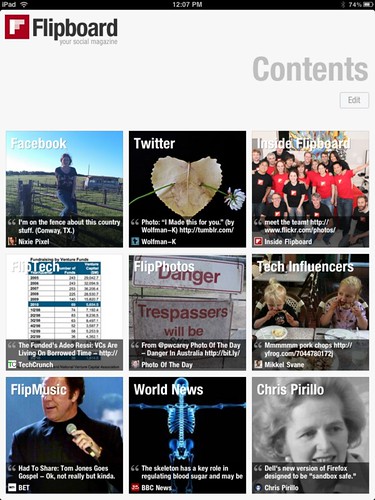
My boss is always pleased to educate me – a self-professed, archetypal earlius adopterus – with his technical insight and technology trendsetting. He didn’t quite beat me to Spotify (although he was very early to that service), but he has stolen the march by introducing me to Flipboard, a ‘social magazine.’ I’d read about it but a combination of iPad apathy and happiness with my methods of absorbing media meant I didn’t investigate further.

Having now tried it, I can tell you that it is an awesome app that is making me fall in love with the iPad again. Essentially, it draws on any feeds you put into it – including a number of useful preset social accounts, such as Facebook, Twitter and Google Reader – and delivers them to you in a magazine style format. You flip through pages in which the content on links people have shared on Facebook and Twitter have been pre-fetched – and you can then tap through to the full article – or watch the video etc.

It’s a wonderful media engagement experience – you can download loads of stories over wifi and then mess around reading offline (for the most part, although the pre-fetch isn’t perfect), commenting on Facebook et al works when you’re online (would like a pre-caching service for when offline so you could maybe queue comments for publication when you came back into wifi range). You can also add any individual blog or feed you like as a separate magazine – all your subscriptions and services appear as a grid of tiles, Windows Phone 7 style.

Really beautifully executed and a very good use of the touch interface of the iPad. Recommended for all you iPad lovers out there – and division6.co.uk looks awesome on it!

My only issue is that I’m not sure it’s very good at ‘getting through’ a magazine or set of updates on Google Reader. Unlike the handy ‘unread post’ notifications you get with the web app, there’s a seemingly endless, jumbled set of updates displayed through the interface. My Google Reader subscriptions include about 40 feeds I read regularly – and about 200 I just dip into – so might well find it frustrating to deal with that much (less relevant) content. Whether I should just flip through it (it is effortless after all) or finally get around to dealing with my mess of subscriptions, who can say…?

Definitely a big thanks to Giles for the pointer!

Churchill on the Internet

Well, not really, obviously, but given my recent posts on various aspects of technology – in which Apple keeps rearing its beautiful, well-designed head – I thought it might be adapted.

Churchill reportedly said:

"Show me a young Conservative and I’ll show you someone with no heart. Show me an old Liberal and I’ll show you someone with no brains."

It strikes me that a similar analogue applies to openness on the Internet. At its core – openness is a good thing. It opens up consumer choice and lets those able to achieve ludicrous ends.

But in my old age (over 30 – therefore possibly not a digital native anymore!) – the practical realities of making everything work together in an open environment is just too much work. Hence the appeal of Evil Apple – with their closed, perfectly designed systems, you can’t do everything. But you don’t need a degree in software engineering to make it work.

I still believe that openness is a good and necessary thing. But I’m an increasingly practical, time-constrained man with too many hobbies for purely open technologies. So I’ll settle for a well-designed, well-executed closed system most times….

I’m still a liberal though. So in Churchill’s view, I’m either an idiot or… still young in some regards… or both.

The iCloud and the connected home?

iCloud I’ve been asked about the ‘Connected Home’ more often recently, by a number of different people. What options are there? Should I buy something?

My answer has been fairly consistent; we’re not there yet. Whatever you mean by ‘connected home’, it isn’t a mass market reality.

The disambiguation is necessary because people mean different things by it – either home automation or networked home entertainment systems – and in neither case are there simple, mass-market products or services for people to buy. By home automation, I mean the automation of household services and devices – for example, automatic, centrally controlled electrics and climate control, curtains that close when you clap, smart metering, Internet fridges and beyond. On the media/entertainment front – I mean streaming music and video to any screen or audio device, surround sound, etc.

On the home automation front, the reason things haven’t progressed is because it’s an expensive, niche market which hasn’t validated the investment to make popular. Everyone’s home is too different and too many mechanical bits and pieces would need to fit in place to make it useful. Standardisation – of things like low-power, short range wireless systems like Zigbee and beyond – has helped with automation of some household services (e.g. smart metering), but even those are a way away. And you’ll be hard pressed to standardise light switches, curtain rails, etc. – all the other bits and pieces which might want to be automated. It’s also largely unnecessary, lazy-making tech, IMHO, with the exception of things like smart electricity stuff which plays a broader role in managing energy usage and isn’t just a technology of convenience.

The reason in the home entertainment space is not dissimilar. There’s too much choice! People have hifis, TVs, iPod docks, PCs, PVRs and more; it’s a rare household that has them all from the same manufacturer and getting them to play nicely with each other – even in a uniform environment – can be an act of such astonishing Macgyvery that even those of us with the propensity and the skills prefer to opt for workarounds rather than actually blu-tak an integrated system together.

In addition, for media streaming to work within a home you need two things – fast, consistently reliable wifi (a dream for most people I know) AND a machine to act as a server – which you leave on all the time. Now, it’s well established that the majority of PCs sold are laptops. And it’s true (if less well established) that PCs left on all the time degrade faster (not to mention waste power the vast majority of the time). Wake-on-LAN – the technology by which these machines turn them selves on when triggered by network activity – has been available for some time, but is another configure-challenge. So I suspect – even in a world where you could buy a NAS or Windows Home Server to suit the purpose – that it will remain a distant dream.

Enter the iCloud. Apple’s world of slick hardware and software uniformity already makes its Airplay / iTunes media sharing features easier to configure than most ‘open’ systems. Not as easy as Spotify, sure, but complete with a massive user base, video as well as music, and a global audience. iCloud, putting all those shared music files into – what is to begin with a music locker but you can be sure in time will become a full-on-demand, real-time streaming cloud repository – paves the way for it to act as the cloud-based media server. So in the same was as AppleTV streams films for you, iPods, Macs and other iTunes enabled devices will be able to bring your media to any room at any time.

It’s frightening that Apple’s going to win here as well, but I don’t know if anyone else has the clout or vision to make this happen. Most people are too tied to commercial realities – that of a mixed market – but with Apple’s enormous margins, ridiculous profitability and ‘trojan horse’ appliances making their way into every room in the house, it seems an inevitability that they’ll win through in this market as it evolves. After all, an accidental connected home is still connected…

Macifying Windows

Mac sous Windows Seven : Soirée présentation Windows Seven{sigh}. Despite promising myself never to go over too far to the dark side, there are some aspects of OSX I’m loving and missing very much on the Windows machines I use. Some things I definitely am not happy about (the lack of a proper blogging client, for one), but here’s a few things I’ve twisted Windows into doing (or tried to) to mimic the capabilities of my Macbook. There was a recent Lifehacker post that inspired this one…

  1. Switcher / Expose clone. Much more practical than ALT-TAB, simple, small third party app.
  2. Two finger scrolling. The simple app doesn’t work on 64bit Windows 7 but I’m trying to mess around with this Synaptics touchpad hack – apparently despite the fact that most new PC touchpads are capable of multitouch gestures they are frequently locked out of using them!

Things I’d like to bring over….

  1. App store. I have to go through a manual FIlehippo trawl to keep my PC software up to date.
  2. Pinch to zoom etc., (which, infuriatingly, doesn’t work with Microsoft Mac applications)
  3. Sparrow!!! One of the most popular search terms on this blog is “Sparrow for Windows” so I know I’m not the only one. C’mon you guys!
  4. The instant sleep / wake and long battery life of OSX, and near instant boot time on the SSD

Things I’m not a fan of:

  1. Network settings on OSX. Feels too fiddly, locked down.
  2. New shortcuts. I’m starting to muddle Windows and Mac shortcuts, forgetting which is which
  3. Lack of decent, affordable blogging clients
  4. Resizing windows from any side. We had to wait through 7 iterations of OSX for that?

If you could create the bastard love child of Windows and OSX, what would you put in it?

Should Microsoft use the same OS on tablets as on PCs?

Jason Snell has a slightly pre-emptive pop at Windows 8 in his blog post ‘Why Windows 8 fails to learn the iPad’s lesson‘ over on Macworld. He writes:

The problem with the announcement is that Microsoft has failed to commit to the tablet as a unique type of device. The company that spent a decade trying to push Windows tablets on a market that just didn’t want them is still convinced that it’s a selling point that Windows 8 tablets will run Microsoft Excel for Windows and if you hook up a keyboard and mouse to them, you can get an arrow cursor and click to your heart’s content.

I’m a little confused. Isn’t Apple’s announcement at WWDC about bringing OSX and iOS closer together (something Jason comments on later in his piece)? Isn’t a single platform exactly what Jobs wants – one, big market for Apps (where the money will be, if it isn’t already?), one consistent experience for users? Also, as an aside, if you’ve read my post on iPad for commuting – if it is to be a knowledge workers’ machine, it does need a keyboard – which is why there’s a burgeoning market for those sorts of iPad accessories.

Secondly – Microsoft has a history of providing multiple (admittedly occasionally ill-considered) flavours of its OS – so I suspect there will be a Windows 8 – Slate Edition – with a few features stripped out, and a few other features brought to the fore.

Uniformity of experience across the different Microsoft platforms makes sense. Users will expect that a Windows Phone and a Windows slate and a Windows PC behave in broadly the same way. The most sensible way to do this – I would guess – is not through superficial similarities, but commonalities in the underlying platform.

The lesson from Apple, IMHO – and not just the iPad, but Apple everything – that Microsoft is beginning to learn (as is Google, as I’ve noted before) is that uniformity and consistency of the experience is a vital part of keeping consumers happy. The single chip / yearly refresh / totally consistent experience across iOS (and to a lesser extent, OSX) forms part of the premium appeal of the brand. This is what Microsoft has done with its hardware requirements for Windows Phone 7, and the controls on customising the platform. The problem for Microsoft is that it can’t take this lesson completely to heart in the desktop/slate market – that would prevent it from reaching the lower end of the market, who want to buy machines with cheaper processors, less RAM and everything else you can save on.

I’m not defending Microsoft or Windows 8 here – it’s far too early to tell if or how they’ll screw up this particular product/platform launch – but this specific lesson didn’t chime with me.

With Windows 8 and mobile computing, CPU manufacturers are interesting again

One of the bizarrely fascinating things about the next generation of computing hardware and software is the fact that microprocessor manufacturers suddenly have an interesting stake in the game. Over the last few years, the Intel/AMD speed race turned into a tediously uninteresting one-horse race, and the mobile processor guys just kept quietly plugging away in the background… and now; ARM and Qualcomm are suddenly a threat to Intel – which – other than its Atom line – hasn’t made significant inroads into the mobile computing market at all.

In a bizarre twist, Microsoft is trying to tie chip vendors to a single hardware manufacturer for Windows 8 (I have no idea how this would work). I suspect this is its ham-fisted attempt to get some consistency of experience established – so that one Windows tablet is very like another – but like the Acer CEO JT Wang, I’m extremely doubtful about the effectiveness of this scheme. The theory makes sense; Qualcomm chips are suited to different form factors to Intel chips (right now, anyway) so it’s not like the Intel/AMD battles of old – where one chip was interchangeable with another.

Still, it will be interesting to see if this new wave of competition will spark some interesting form factors. Perhaps a shoe-tablet

Windows 8 – designed to annoy CIOs?

OK, so the Windows 8 first look is out and – on the face of it – kind of cool. Finally, Microsoft has worked out what a touch screen interface should do differently! Although it does feel like a very early look – judging by the fact that when they showcase non-Windows 8 HTML5 apps – it looks exactly like Windows 7…

My comment about CIOs is not so much to do with the specifics of the platform – of which we’ve seen too little to say anything other than ‘oooh, shiny’ – but the speed of the refresh cycle. Thanks to the mediocrity of Windows Vista, most enterprises that run Windows (even smaller ones like the one I work for) skipped it, and are probably in the midst of a migration from Windows XP to Windows 7. That was the best part of a 10 year gap.

The migration – especially in smaller enterprises, although I know of larger ones doing this too – will let happen naturally with hardware refreshes.

Now: it’s partially my obsessive tendencies, but I’d really like a uniform OS estate across my company. It’d make management and training so much easier. Ditto rollout of new services. So every three years for a new OS? Too fast, if they’re going to change as much as it looks like they might in UI and usability. And even though hardware refreshes tend to take place every three years or so – they tend to happen in waves, especially in growing companies. Not everyone gets a new machine at the same time…

Also; touch in the enterprise? Wonderful for marketing and useful on tablets (or ‘slates’ as Microsoft bizarrely insists on calling them) – but really not useful for knowledge workers. Well, maybe on a Microsoft Surface machine – not on a desktop, for reasons I’ve gone into before – as long as we need to type, touch is a secondary interface for most people.

Regardless, will watch with interest. I’m afraid my home-life slide into Jobs-land is probably irreversible (for the moment) with any incremental upgrade but will watch with interest.

Outlook 2011 defaults to local Exchange server details [troubleshooting]

I can’t fix this one or find information on it anywhere, but – probably due to Outlook 2011’s clever autodetect capabilities – when its within a corporate firewall it takes the local name of the server – not the externally visible OWA address – so when you leave the firewall the server doesn’t resolve.

My only fix at the moment is to keep changing the address manually in the settings. I’ve tried this but it doesn’t work – I’ve also tried configuring the mailbox manually from outside the corporate firewall but that resets once I’m on the office Wifi too.

Any tips from Macheads or Microsofties appreciated. Will keep scouring the forums, too.